Write it down the day it happens.
Participate helps a business owner keep signed, dated records of the hours they put in, ready for whoever prepares their return.
It's built for business owners whose tax plan depends on the hours they put in, whether they run a rental, a solar array, an aircraft or another business. Use it on your own, or get it through your wealth advisory firm.
- Signed and dated by the owner
- Ready at tax time
- On your own or through your advisor
Who it's for
Built for business owners. Offered by their advisors too.
The owner always keeps the records. They can sign up on their own, or get Participate through their wealth advisory firm.
Solo
For business owners
Keep the records for your own businesses. Log the work as it happens, approve each record, and invite your CPA if you want a review. If your advisory firm offers Participate, you get the same app through them.
- Every business you own.
- Track a cabin, a solar array, an aircraft or a farm side by side, each with its own hours.
- About a minute per entry.
- Pick the kind of work, the day and the time, and say what you decided. You confirm the time yourself.
- Text your logs.
- Send a text when you finish a piece of work. It comes back as a draft for you to approve.
- Your CPA, if you want one.
- Invite your CPA to read the records, comment and ask for changes before you file.
Enterprise
For wealth advisory firms
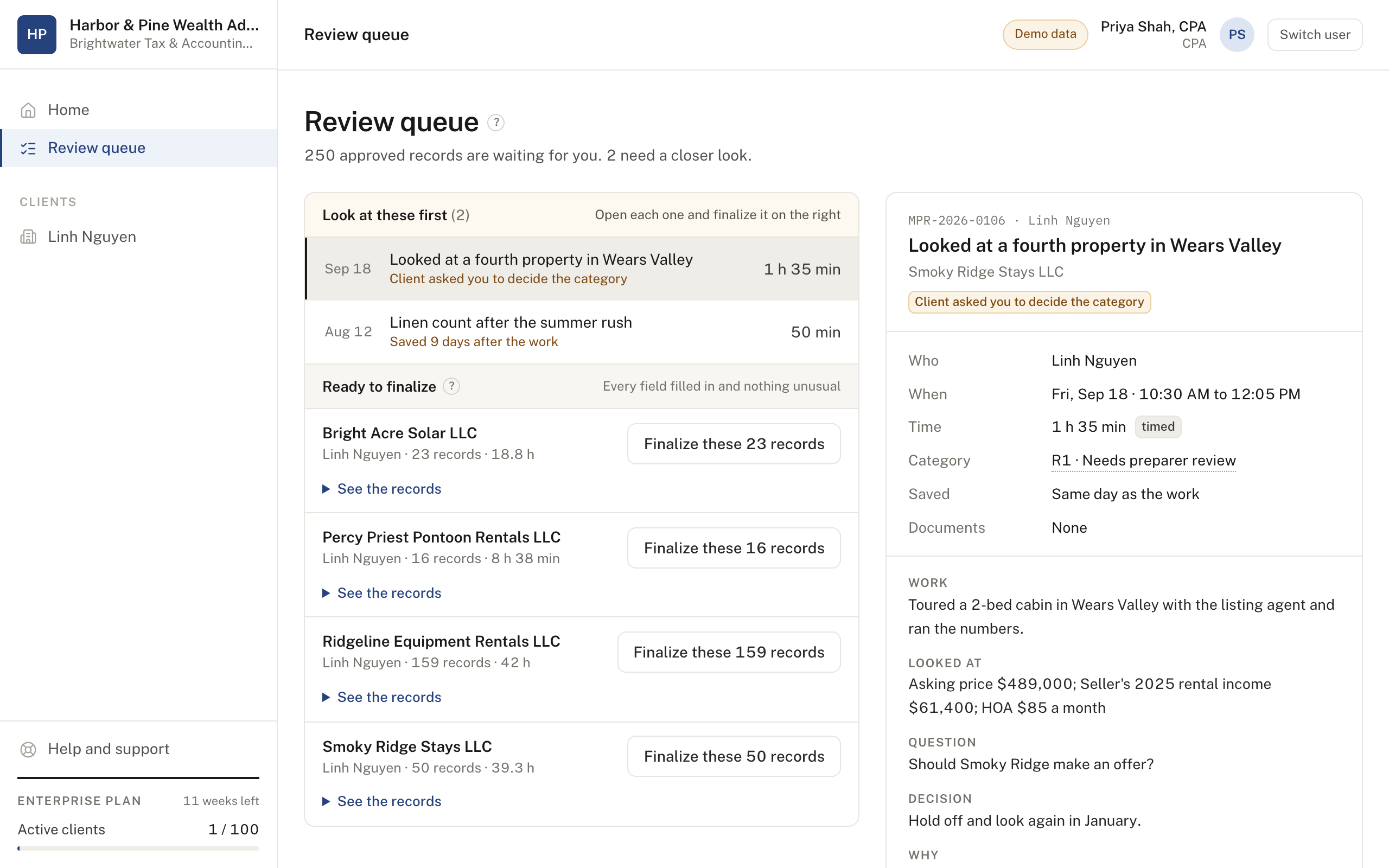
Offer Participate to clients whose plan depends on material participation. Give it to them free as part of your service, or resell it. Your clients log their hours, and your firm sees where each one stands.
- Free to your clients, or resold.
- Include it in your service at no cost to clients, or resell it at your own price. Your firm is billed per active client either way.
- Every client on one page.
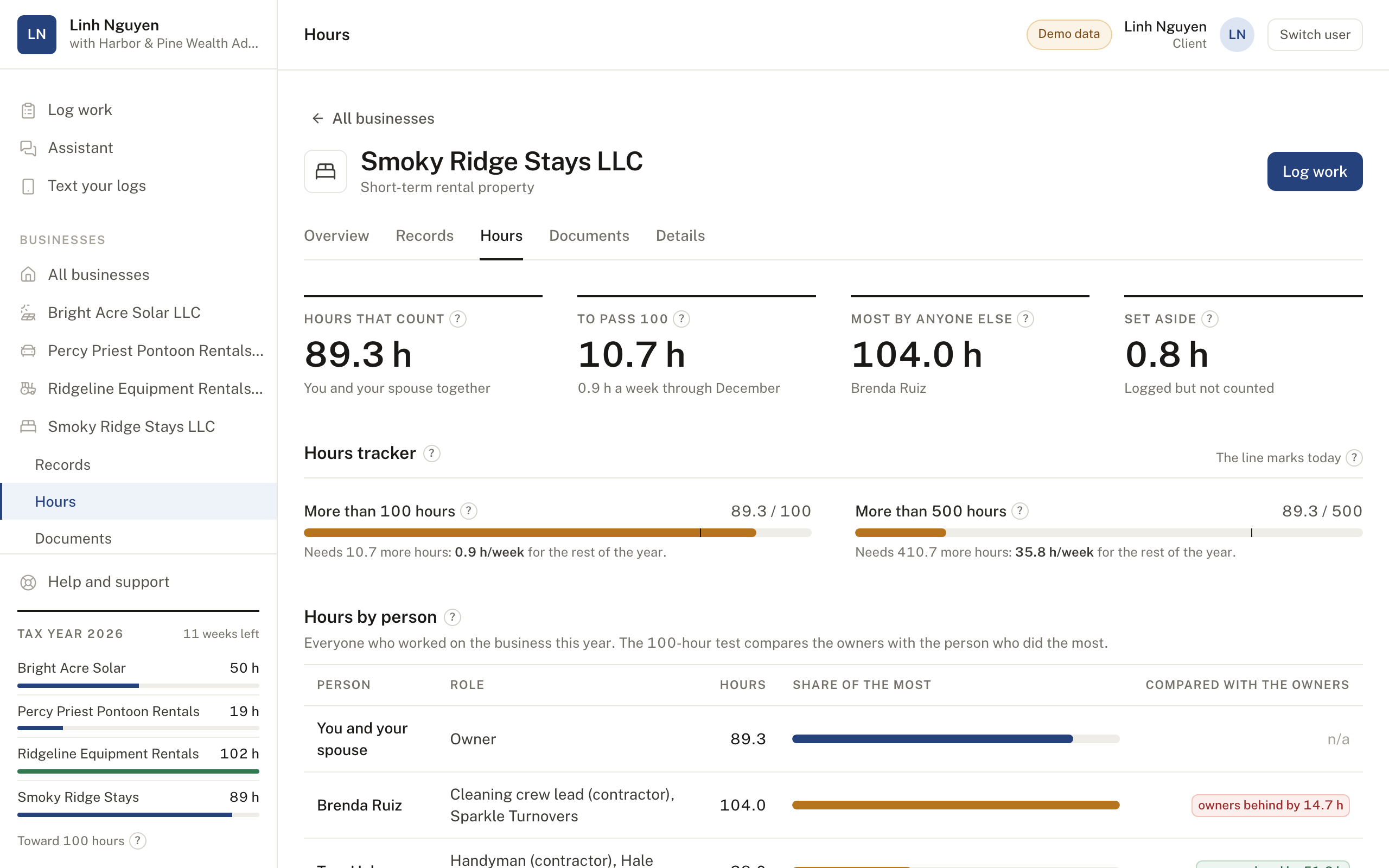
- See the participation hours for each business, who's ahead in the 100-hour comparison, and the weekly pace each client needs to finish the year.
- A to-do list for the firm.
- See which clients are falling behind, which haven't logged anything yet, and which are still waiting for a CPA.
- Each client's CPA, wherever they work.
- Assign a CPA on your staff or at an outside firm. An outside CPA sees only the clients you assign to them.
- Roles that match the work.
- Your admin manages clients, people and settings. Advisors and compliance staff can read the records. A CPA can review the records the client approved.
- Your firm's name on it.
- Records and annual summaries carry your firm's name and colors, with single sign-on for your staff.
The record
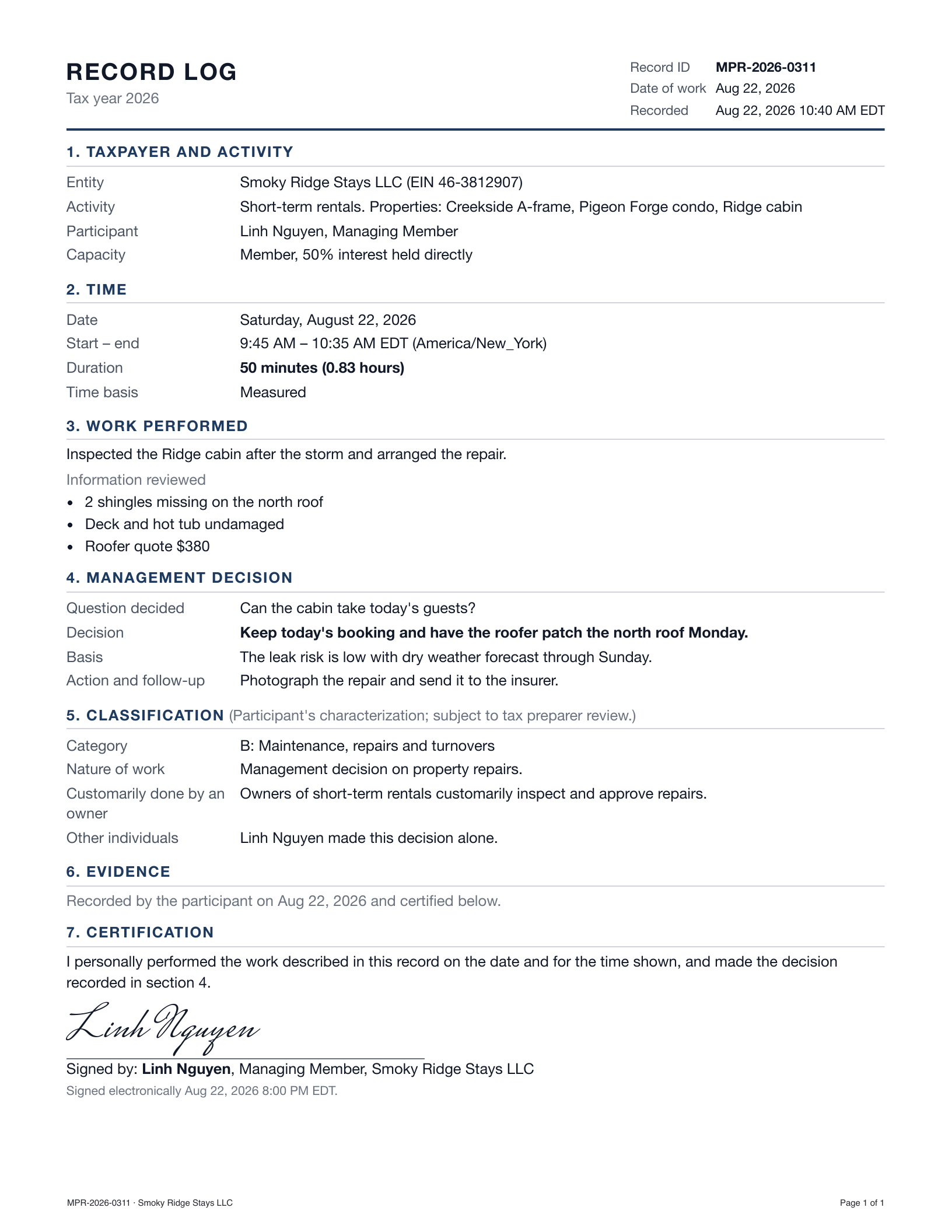
One page, laid out the same way every time.
Every record has the same parts in the same order, so a year of them reads quickly. The app won't let an owner approve a record that is missing a time, a decision or the reason for it.
- Dated by the server
- The server stamps the time each record was written, and nobody can edit it. A correction becomes a new version, and the original stays on file.
- Time is labeled honestly
- Every record says whether its time was timed, estimated or shared. Breaks, travel and waiting are left out.
- Decisions in the owner's words
- The question, the decision, the reason and the follow-up are written by the person who made the call.
- Categories are the owner's call
- Every category is labeled as the owner's characterization, subject to tax preparer review.
- Evidence comes along
- Screenshots, quotes, emails and platform reports are attached with their source and timestamp.
What they run
Any business where the hours matter.
The record looks the same whatever the business, and the kinds of work and examples are tailored to it.
Short-term rentals
Pricing reviews, guest problems, turnovers, cleaners, repairs, supplies and listing changes. Cleaning crews put in a lot of hours, so the tracker shows how the owner compares.
Lower weekday rates at the Pigeon Forge condo by 12% for the next 30 days.
Solar and renewable energy
Build meetings, production alerts, the utility, subscribers and power buyers, maintenance and certificate sales. Owning the array is just the start, and the records show the work of running it. The installer and O&M crew count in the hour comparison, so their hours are tracked too.
Call the installer out today under the warranty for inverters 9 and 10.
Aircraft charter and leasing
Charter requests and rates, pilots and crew, maintenance and inspections, the management company, hangar and FAA paperwork.
Book the phase 3 inspection for the week of March 9.
Heavy equipment and vehicles
Bookings, deliveries, service intervals and operators. Scheduled telematics reports arrive by email and each one gets a decision.
Move SK-04 to the Cedar Creek site for next week's grading work.
Farms and ranches
Planting and harvest decisions, livestock, selling crops, inputs, farm hands, crop insurance and USDA programs.
Contract 20,000 bushels of corn at $4.65.
Car washes, storage and more
Running the location, customer problems, equipment repairs, prices, memberships and staff schedules. Participate fits any business where your hours matter.
Rebuild the high-pressure pump Monday, when traffic is lowest.
How it works
From a phone call to a filed return.
The owner logs and approves every record, and is responsible for what they report. A CPA can review the records if the owner invites one.
- 1
Log
The owner starts a timer or enters a start and end time, then writes what they did and what they decided.
- 2
Approve
The owner certifies the record. We save it as a one-page PDF with a fingerprint (a content hash), and only a new version can change it.
- 3
Review, if invited
If the owner works with a CPA, on the advisory firm's staff or at their own firm, the CPA can read the records, comment and ask for changes.
- 4
Export
Download a spreadsheet log with live formulas, an annual summary, and a ZIP of every record and exhibit, with a fingerprint for each file.
The 100-hour test
Who put in more hours, checked every week.
The owner's hours are often weighed against everyone else who worked in the business: a cleaning crew, a solar technician, a chief pilot, a farm hand. The tracker adds a spouse's hours to the owner's and works out the weekly pace needed for the rest of the year.
| Smoky Ridge Stays, Oct 12 | Hours | |
|---|---|---|
| Linh and Minh Nguyen, owners | 93.1 | Categories A to G, both spouses |
| Brenda Ruiz, cleaning crew lead | 104.0 | From the contractor's invoices |
| Gap to close | 10.9 | About 1 hour a week for the 11.5 weeks left |
This example account uses fictional data. The owner is responsible for the hours they report, and Participate doesn't decide whether hours count.
Trust
People make every call that matters.
- The owner approves every record.
- Their approval certifies that they did the work on that date, for that long.
- Times are never filled in for you.
- If a time, a figure or a decision is missing, the record waits until the owner adds it.
- AI drafts stay drafts.
- An owner can ask for a draft from their notes. Every drafted field is marked until they edit it and sign the record.
- Approved records stay on file.
- After the owner approves a record, a correction becomes a new version, and both stay on file.
- The owner is responsible for what they report.
- Participate records the work as the owner describes it. It doesn't decide whether hours meet a participation test, and neither the advisory firm nor a reviewing CPA certifies the hours.
Taxpayer records, kept apart and logged.
- Each account is walled off in the database.
- The database itself keeps one firm's records away from another's, and a test checks every table.
- An outside CPA sees only their clients.
- The database shows each CPA the clients the firm assigned to them, and nothing else.
- Tax IDs are encrypted one by one.
- Each EIN is encrypted as its own field, and every time one is read, the audit log notes it.
- The audit log only grows.
- Every record created, approved, reviewed or exported is written down, and nobody can edit the log.
- Your records leave with you.
- Export every record, PDF and exhibit whenever you like. We keep records for at least 7 years after the tax year.
Pricing
Two plans.
Owners can buy Solo directly. Wealth advisory firms buy Enterprise and offer it to their clients, free or resold.
Solo
For a business owner keeping the records for their own businesses.
$2,000a year
- +You and your spouse
- +Every business you own, and its properties or systems
- +Records, PDFs and the hours tracker
- +Your CPA, invited to review if you want
- +Exports for your return
Enterprise
For wealth advisory firms that offer Participate to their business-owner clients, free or resold.
Priced per firm
- +Priced by active clients
- +Free to your clients, or resold at your price
- +Every client's hours on one page
- +Each client's CPA, on staff or outside
- +Single sign-on and your firm's branding
Solo is billed once a year. Both plans start with a 30-day trial.
Questions
Common questions.
- Which businesses does it work for?
- Any business where an owner needs to show the hours they put in: short-term rentals, RVs and boats, heavy equipment, solar and renewable energy, aircraft, farms, car washes, storage and other operating businesses. One account can track several.
- Does Participate decide whether my hours count?
- No. It records the work you describe, and you're responsible for reporting your hours accurately. Every category is labeled as your characterization, subject to tax preparer review.
- Do I need a CPA to use Solo?
- No. Solo works on its own. You can invite your CPA to read the records and ask for changes if you want a second set of eyes.
- Can I ask questions inside the app?
- Yes. The assistant explains how kinds of work are usually categorized and how the participation tests generally work. It can also turn what you tell it into a draft log entry, which you save and then approve. It isn't a CPA or financial advisor, and your preparer can advise you on how your hours are treated.
- I run more than one business. Is that one account?
- Yes. Add each one, whether it's a cabin, a solar array or an aircraft, and your home page shows all of them with their hours side by side.
- What about my employees and contractors?
- Enter their hours from invoices, timesheets or payroll. The tracker sets them against yours, since the 100-hour comparison looks at everyone who worked in the business.
- My advisory firm offers Participate. Do I pay?
- Your firm decides. Some include it at no cost to their clients and some charge for it. Either way, you use it the same way an owner on Solo does.
- Can our firm give it to clients for free, or resell it?
- Yes, either one. Enterprise is priced per active client, and your firm decides what clients pay, including nothing.
- Our firm doesn't have CPAs on staff. Does it still work?
- Yes. Assign each client to the CPA who prepares their return, on your staff or at an outside firm. An outside CPA signs in and sees only the clients you assigned to them.
- Who at the firm does what?
- Your admin adds clients, assigns each one a CPA, and manages people and settings. Advisors and compliance staff can read every record. A CPA can review records the client approved. The client remains responsible for the hours they report.
- How do advisory firms pay?
- Enterprise is priced by active clients, meaning clients with at least one logged session in the year. Clients you've set up who haven't started yet are free.
Start with one business.
Owners: tell us what you run and who prepares your return. Advisory firms: tell us how you'd like to offer it to your clients, and we'll set up the first one with you.